Haiya Display Font for Web Design
Haiya is a display font that brings charm and character to digital designs. With its soft curves and playful yet elegant strokes, it's ideal for projects that need a touch of personality without sacrificing readability. As a web designer, I've found that the right typeface can make all the difference in how users perceive a brand or message.
Visual Characteristics and Digital Appeal
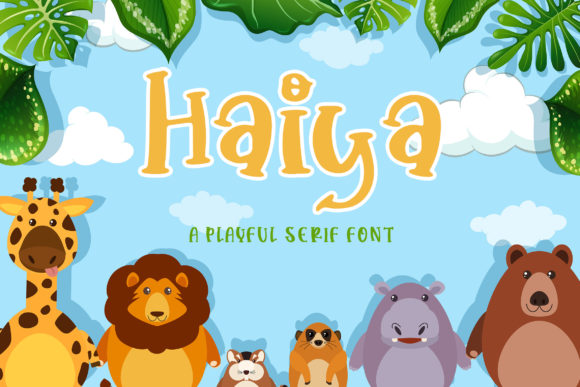
Haiya has a distinct visual style that blends cuteness with sophistication. Its letterforms are rounded but not overly so, making it approachable yet professional. This balance makes Haiya particularly well-suited for creative portfolios, children’s websites, and any project that benefits from a warm, inviting tone.
The font's personality shines through in subtle details like the serifs on uppercase letters and the gentle slant of lowercase characters. These features contribute to a cohesive look across different platforms and screen sizes.
Applications in Web Design
When designing landing pages or hero sections, Haiya can serve as an eye-catching headline font. Its legibility at larger sizes ensures that key messages stand out while maintaining a friendly presence. For instance, using Haiya for a boutique online store’s banner can instantly convey a sense of fun and creativity.
On coaching websites or course sales pages, Haiya works well for section headings and call-to-action buttons. It adds a personal touch that helps build trust with visitors. Pairing Haiya with a clean sans serif font for body copy enhances readability and maintains a strong visual hierarchy.
In portfolio sites or blog headers, Haiya can be used as a decorative accent. It complements minimalist layouts by adding just enough flair without overwhelming the content. The font also performs well in dark mode settings when paired with high-contrast text colors.
Readability and User Engagement
One of the most important aspects of choosing a display font is ensuring it remains readable across various devices. Haiya excels in this area, especially when used for short phrases or titles. On mobile screens, its clear shapes and generous spacing help maintain legibility even at smaller sizes.
For conversion-focused layouts, Haiya’s friendly appearance can encourage interaction. Whether it's a CTA button on a product landing page or a header on a digital ad, the font’s approachable nature helps reduce user hesitation and increase engagement.
However, it's best to avoid using Haiya for long paragraphs or body text where legibility might suffer. Instead, use it as a supporting typography element to highlight key information or add visual interest to otherwise plain sections.
Font Pairing and Brand Identity
Font pairing is essential for creating a balanced design. Haiya pairs beautifully with simple sans serif fonts like Arial or Helvetica for body copy, allowing the display font to take center stage without clashing. For more editorial-style websites, combining Haiya with a serif font such as Georgia can create a refined yet charming aesthetic.
Consistency in branding is another benefit of using Haiya. Its unique style can become part of a brand’s identity, appearing in logos, social media graphics, and packaging design. When used consistently across different platforms, Haiya reinforces brand recognition and builds a cohesive digital presence.
Practical Considerations
Before implementing Haiya in a project, check if it includes multiple styles, weights, and multilingual support. These features can enhance versatility, especially for global audiences or complex layouts that require varied typographic treatments.
Also, ensure that you have the appropriate commercial font license if you're using Haiya for client projects, online stores, or digital templates. A proper license guarantees legal usage and protects both the designer and the client from potential issues down the line.
Webfont availability is another factor to consider. If Haiya offers webfont formats, it will load efficiently on websites, contributing to faster page speeds and better user experiences. Always test the font in different environments to confirm its performance and compatibility with existing design systems.
Whether you're working on a creative font collection, a digital brand kit, or a new SaaS landing page, Haiya provides a versatile option that aligns with modern typography trends. Its blend of playfulness and professionalism makes it a valuable addition to any designer's toolkit.